Huge improvement! I added a Lumin channel and it looks much better.
I will keep working on this and making it a single CMYK file to simplify it a bit. Also want to get the angle print back but on the single file as stated.
Download Removed - See my next post.
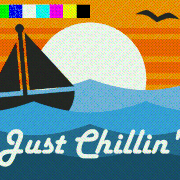
EDIT: Added a color test pattern at the top and CMYK rotation.
Last edited by J. Baker on Fri Jun 19, 2026 9:23 am, edited 1 time in total.
J. Baker wrote: ↑Wed Jun 17, 2026 7:20 pm
... Maybe tomorrow I will create a zip file containing all this if anyone is interested.
looking good! well done. love to see the (updated) .zip if you're still up to sharing it.
Here it is!
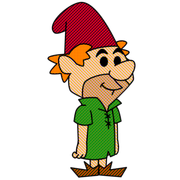
This uses a single CMYK image filter and 50% lumin filter to adjust for the offset of brightness. This should be perfect for classic comic style print or animation. Render a frame and zoom in to see. If you need a higher res CMYK image for your own project, just let me know.
EDIT: Download removed. See new download below.
Preview Gif
Last edited by J. Baker on Sun Jun 21, 2026 10:10 pm, edited 2 times in total.
I've updated the download link above (minor adjustments to masking and note added) and the preview GIF. Just in case anyone has downloaded it. I also changed the link to my website instead of a freebee website that only lasted 7 days. Enjoy!
J. Baker wrote: ↑Fri Jun 19, 2026 10:22 am
I've updated the download link above (minor adjustments to masking and note added) and the preview GIF. Just in case anyone has downloaded it. I also changed the link to my website instead of a freebee website that only lasted 7 days. Enjoy!
Thanks! (no preview .gif in the .zip, but no biggie - and yes - did check that I used the posemotion link!)
One approach you might like to consider for applications in larger formats than the 1000*800 px in your (excellent) demo: rather than the cmyk.png as a layer - I replaced it with a moho vector shape that uses the .png as an image texture set to tile, then the effects handle can scale and rotate the whole. This vector layer has the same attributes as the baseline .png.
(but I also guess you could generate a .png larger than to 1024px square that you have here?)
hayasidist wrote: ↑Sat Jun 20, 2026 2:02 am
Thanks! (no preview .gif in the .zip, but no biggie - and yes - did check that I used the posemotion link!)
One approach you might like to consider for applications in larger formats than the 1000*800 px in your (excellent) demo: rather than the cmyk.png as a layer - I replaced it with a moho vector shape that uses the .png as an image texture set to tile, then the effects handle can scale and rotate the whole. This vector layer has the same attributes as the baseline .png.
(but I also guess you could generate a .png larger than to 1024px square that you have here?)
Oh, the GIF preview is on the forum here in the same post as the download.
I'm not sure what you mean on how you replace it? I originally tried a vector file but Moho couldn't handle that many vector dots. Locked my system up anyway. EDIT: Oh, I see. You tiled it inside a vector layer. Very smart.
Yes, I can make larger PNG files if needed. I have it coded in PureBasic.
Update. Reordered the layers for better CMYK masking. White no longer displays any of the CMYK values as it is white and shouldn't. The Luminosity layer is no longer needed. Looks much better now.
J. Baker wrote: ↑Sun Jun 21, 2026 10:04 pm
Update. Reordered the layers for better CMYK masking. White no longer displays any of the CMYK values as it is white and shouldn't. The Luminosity layer is no longer needed. Looks much better now.
hmm -- I agree about the white - not so sure about the other primary / secondary colours.. the colour test bar reveals what I think shows the symptom - those don't show any of the CMYK values either. I'd have expected pure e.g. Cyan to show a "dot" pattern??? Pure black (x000000) the same???
J. Baker wrote: ↑Sun Jun 21, 2026 10:04 pm
Update. Reordered the layers for better CMYK masking. White no longer displays any of the CMYK values as it is white and shouldn't. The Luminosity layer is no longer needed. Looks much better now.
hmm -- I agree about the white - not so sure about the other primary / secondary colours.. the colour test bar reveals what I think shows the symptom - those don't show any of the CMYK values either. I'd have expected pure e.g. Cyan to show a "dot" pattern??? Pure black (x000000) the same???
Limitations in the software or trying to replicate true accuracy might not be possible. It appears the brightest RGB colors that mostly use a 255 value(s) don't show much. Slightly adjusting a lower value does. Which helped the white color but not the colors you just mentioned from the test pattern. Kind of a trade off from the previous test.
I will play with it some more to see what I can get but the idea was to create an over-emphasized look of halftone print to create a retro look of comic style graphics. I believed that has been achieved but just don't know how close to 100% accurate it can get.








 哈哈哈,谢谢,这很有趣~