

Yesterday I hopefully seduced someone into using Moho for cutout animation. They are total beginners, so some basic concepts need to be explained first: how to prepare stuff and get into Moho, which stuff ist suitable (resolution!), and then the Moho-related stuff like layers, keys, bones etc. I had a short look into some tutorial videos which crept up in a search: not directly wrong, but maybe a bit clumsy and not really to the point, and I'm not the type for videos anyway. I have a soft spot for this style and like to spread my knowledge about history, aesthetics and techniques. It's a style easily done with Moho Debut, which would be a good starting point for beginners.
So I wonder: do you think it would be worth the trouble to write a small book especially for cutout animation?
Cutout animation howto
Moderators: Víctor Paredes, Belgarath, slowtiger
Cutout animation howto
AS 9.5 MacPro Quadcore 3GHz 16GB OS 10.6.8 Quicktime 7.6.6
AS 11 MacPro 12core 3GHz 32GB OS 10.11 Quicktime 10.7.3
Moho 13.5 iMac Quadcore 2,9GHz 16GB OS 10.15
Moho 14.1 Mac Mini M2 Pro OS 13.7.6
AS 11 MacPro 12core 3GHz 32GB OS 10.11 Quicktime 10.7.3
Moho 13.5 iMac Quadcore 2,9GHz 16GB OS 10.15
Moho 14.1 Mac Mini M2 Pro OS 13.7.6

Re: Cutout animation howto
Yes! Cutouts are great, and there aren't many good books on the topic. I wouldn't limit the book to Debut, though.
I would guess that it would be popular due to the success of South Park.
One thing Moho can do nicely is keep all the cutouts flat, with no curling up under hot lights. : )
I would guess that it would be popular due to the success of South Park.
One thing Moho can do nicely is keep all the cutouts flat, with no curling up under hot lights. : )
Re: Cutout animation howto
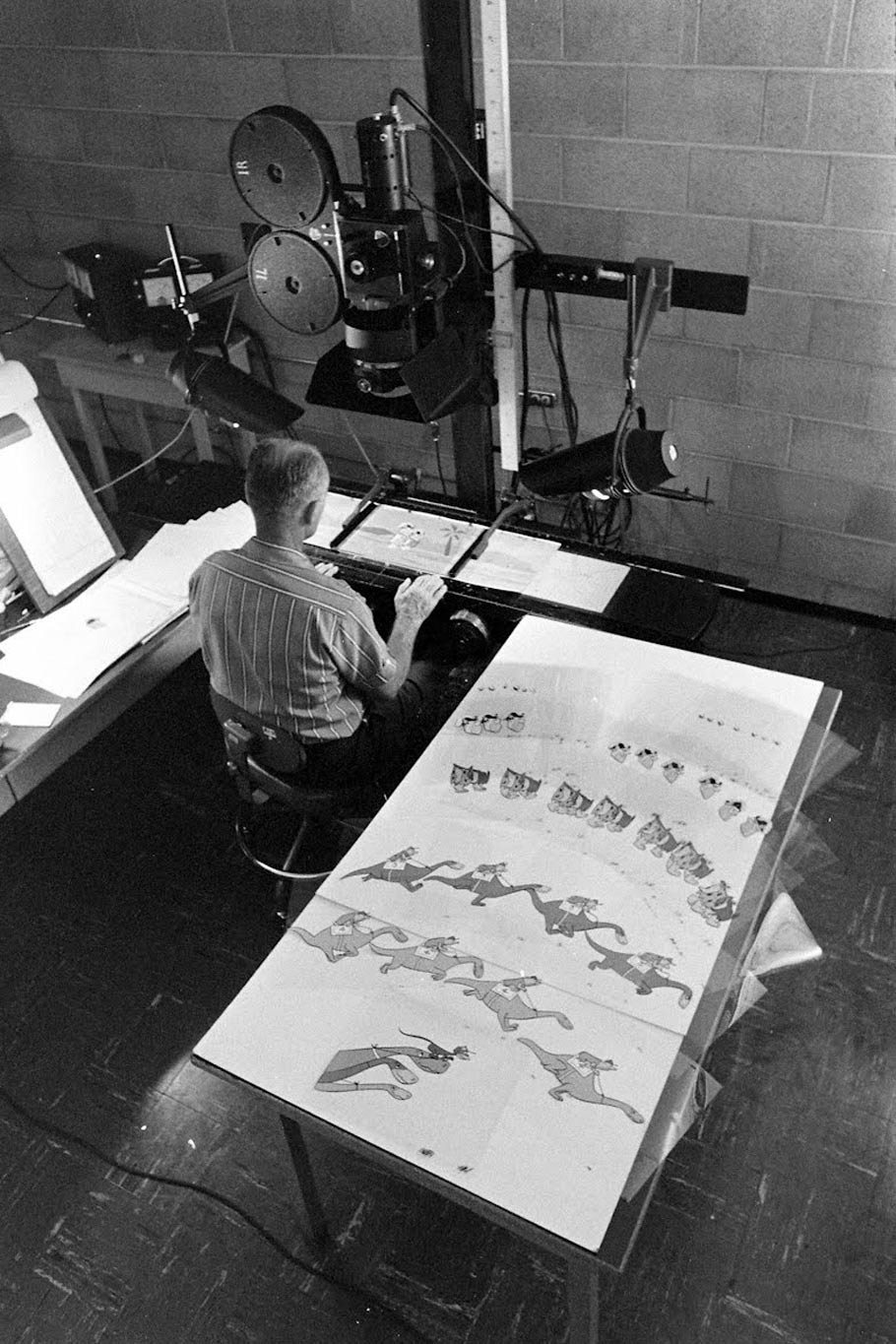
Cut-out animation has been around for a very long time, they used to call it limited animation, in tv series like the Flintstones, they used a glass plate to hold the pieces down so they don't curl or move !
Re: Cutout animation howto
I'm sorry, but limited animation is something completely different from cutout animation!
<teacher mode>
Limited animation is defined by breaking up a character into moving and not much moving parts, like a stand-still face and body with moving mouth and blinking eyes; and it's often relying on heavy re-use and cycling animation, think of Fred Flintstone running: alays the same run cycle in every episode. The parts were traced and painted traditionally on cels, which were punched and put on peg bars to assure registration. Aside from this assembly-line approach the drawings themseves could be as loose as usual.
Cutout animation at the core is cut-out parts being moved independently under the camera (with no registration). This was refined immediately by rigging parts with real joints (like a jumping jack, you can see that in some of the earliest silent films). The parts didn't transform or distort, but could be replaced by others. (Examples: "Monsieur Tête" (Jan Lenica) https://www.youtube.com/watch?v=odsIansn5Yk for the classical jerkiness, and of course "Hedgehog in the fog" (Yuri Norstein) https://www.youtube.com/watch?v=ThmaGMgWRlY which often is named the pinnacle of what can be achieve with cutout animation.)
The main defining difference is the use of or absence of registration. Classic cutout animation may appear jerky for this reason. Limited animation breaks up characters into parts, but aims to create a smooth movement.
A technique often used in eastern europe, but also in france (René Laloux!), was to animate FBF on paper, colorize these drawing luxuriously, then cut out the characters and paste them on punched cels. Best known example would be "La planet sauvage" (Fantastic Planet). This approach doesn't count as cutout animation.
Of course with Moho we can have the best of both worlds in one: separated parts, exchange animation, freely animated or rigged, and everything is registered without the hassle of punching cels. The only thing missing would be the little signs of analogue filmmaking: paper outlines, little shadows, some dust, some reflections, and the occasional hand in the frame.
</teacher mode>
<teacher mode>
Limited animation is defined by breaking up a character into moving and not much moving parts, like a stand-still face and body with moving mouth and blinking eyes; and it's often relying on heavy re-use and cycling animation, think of Fred Flintstone running: alays the same run cycle in every episode. The parts were traced and painted traditionally on cels, which were punched and put on peg bars to assure registration. Aside from this assembly-line approach the drawings themseves could be as loose as usual.
Cutout animation at the core is cut-out parts being moved independently under the camera (with no registration). This was refined immediately by rigging parts with real joints (like a jumping jack, you can see that in some of the earliest silent films). The parts didn't transform or distort, but could be replaced by others. (Examples: "Monsieur Tête" (Jan Lenica) https://www.youtube.com/watch?v=odsIansn5Yk for the classical jerkiness, and of course "Hedgehog in the fog" (Yuri Norstein) https://www.youtube.com/watch?v=ThmaGMgWRlY which often is named the pinnacle of what can be achieve with cutout animation.)
The main defining difference is the use of or absence of registration. Classic cutout animation may appear jerky for this reason. Limited animation breaks up characters into parts, but aims to create a smooth movement.
A technique often used in eastern europe, but also in france (René Laloux!), was to animate FBF on paper, colorize these drawing luxuriously, then cut out the characters and paste them on punched cels. Best known example would be "La planet sauvage" (Fantastic Planet). This approach doesn't count as cutout animation.
Of course with Moho we can have the best of both worlds in one: separated parts, exchange animation, freely animated or rigged, and everything is registered without the hassle of punching cels. The only thing missing would be the little signs of analogue filmmaking: paper outlines, little shadows, some dust, some reflections, and the occasional hand in the frame.
</teacher mode>
AS 9.5 MacPro Quadcore 3GHz 16GB OS 10.6.8 Quicktime 7.6.6
AS 11 MacPro 12core 3GHz 32GB OS 10.11 Quicktime 10.7.3
Moho 13.5 iMac Quadcore 2,9GHz 16GB OS 10.15
Moho 14.1 Mac Mini M2 Pro OS 13.7.6
AS 11 MacPro 12core 3GHz 32GB OS 10.11 Quicktime 10.7.3
Moho 13.5 iMac Quadcore 2,9GHz 16GB OS 10.15
Moho 14.1 Mac Mini M2 Pro OS 13.7.6

Re: Cutout animation howto
Hi, slow tiger
 I think what you said is very necessary. Although [Paper Cuttings animation] is not difficult to achieve in the moho animation system, it needs to cross multiple software collaboration, and indeed needs an experienced and standardized process. Most of the Moho learners I know do not want to delve deeper into node modeling (sad), they only want to use Moho to quickly create animations, but they receive too little effective guidance.
sang820
Wishing you all the best
I think what you said is very necessary. Although [Paper Cuttings animation] is not difficult to achieve in the moho animation system, it needs to cross multiple software collaboration, and indeed needs an experienced and standardized process. Most of the Moho learners I know do not want to delve deeper into node modeling (sad), they only want to use Moho to quickly create animations, but they receive too little effective guidance.sang820
Wishing you all the best
-
neeters_guy

- Posts: 1628
- Joined: Mon Sep 14, 2009 11:33 am
- Contact:
Re: Cutout animation howto
A bit late to the party, but YES! I would love to see a how-to on cutout animation, especially from the esteemed slowtiger!
-
psychoanima
- Posts: 20
- Joined: Mon May 23, 2011 4:10 pm
Re: Cutout animation howto
When it comes to cut-out animation, it really depends on the era in question. Is it traditional (Lotte Reiniger style) cut-out, or digital (South Park style) cut-out? With traditional methods, you’re using the straight-ahead approach to animate. With digital, it’s usually a mix of pose-to-pose and straight-ahead. How much limbs you give your character is a matter of taste and how complex you want the motion to be, but equally important is the frame rate: in the digital world, animation is often done on 1’s, while traditional cut-out is mostly on 3’s. So, if you’re after that old cut-out look, go straight-ahead and animate on 3’s.
Re: Cutout animation howto
I think this "on 1's" vs. "on 2's" debate is a bit too simplified.
First, this should not be called frame rate, as the frame rate is the fixed playback speed of 25/25/30 FPS. It should be called exposure, or number of exposures.
Second: I wouldn't tie that to any era or even to analog vs. digital. Lotte Reiniger animated mostly on 1's, as most animation before 1930 was done, until it was observed that animating on 2's was good enough for most purposes. This is not just a financial decision but one of style: on 2's added a certain springiness to the movements. Anyway, any decent animator would adjust their exposures to the movement: fast stuff on 1's, ordinary movements on 2's, and very slow stuff on 4's or any other exposure. Certain stylized movements would only work on 2's or on 3's, adding inbetweens to bring them on 1's would break the style.
In cutout animation, especially in european films from 1950 to 1980, exposure times were wildly over the place, which was another decision based on style.
South Park is a good example for digital animation mimicking this latter approach: if you watch it frame by frame (not on youtube) you'll notice that they use anything but 1's for a longer time.
In the end, one should be inspired by older animation works, but not necessarily mimicking it. Chose your style, have a clear definition of what kind of movement fits, and stick to that. There's a certain brand of more motion graphic oriented animation often used in music videos since 2000 which tends to be very smooth, even going so far as to add motion blur to their cutout animation. That's totally legit, of course.
First, this should not be called frame rate, as the frame rate is the fixed playback speed of 25/25/30 FPS. It should be called exposure, or number of exposures.
Second: I wouldn't tie that to any era or even to analog vs. digital. Lotte Reiniger animated mostly on 1's, as most animation before 1930 was done, until it was observed that animating on 2's was good enough for most purposes. This is not just a financial decision but one of style: on 2's added a certain springiness to the movements. Anyway, any decent animator would adjust their exposures to the movement: fast stuff on 1's, ordinary movements on 2's, and very slow stuff on 4's or any other exposure. Certain stylized movements would only work on 2's or on 3's, adding inbetweens to bring them on 1's would break the style.
In cutout animation, especially in european films from 1950 to 1980, exposure times were wildly over the place, which was another decision based on style.
South Park is a good example for digital animation mimicking this latter approach: if you watch it frame by frame (not on youtube) you'll notice that they use anything but 1's for a longer time.
In the end, one should be inspired by older animation works, but not necessarily mimicking it. Chose your style, have a clear definition of what kind of movement fits, and stick to that. There's a certain brand of more motion graphic oriented animation often used in music videos since 2000 which tends to be very smooth, even going so far as to add motion blur to their cutout animation. That's totally legit, of course.
AS 9.5 MacPro Quadcore 3GHz 16GB OS 10.6.8 Quicktime 7.6.6
AS 11 MacPro 12core 3GHz 32GB OS 10.11 Quicktime 10.7.3
Moho 13.5 iMac Quadcore 2,9GHz 16GB OS 10.15
Moho 14.1 Mac Mini M2 Pro OS 13.7.6
AS 11 MacPro 12core 3GHz 32GB OS 10.11 Quicktime 10.7.3
Moho 13.5 iMac Quadcore 2,9GHz 16GB OS 10.15
Moho 14.1 Mac Mini M2 Pro OS 13.7.6
-
psychoanima
- Posts: 20
- Joined: Mon May 23, 2011 4:10 pm
Re: Cutout animation howto
Learning any animation style requires first mastering the fundamental principles of animation. These principles apply universally, whether the medium is hand-drawn, 3D, stop-motion, or cutout. Once those fundamentals are understood, the choice of medium becomes secondary.
Cutout animation is essentially just one way of applying the same principles, with its own technical quirks. To learn cutout, you must already know how to animate; without that foundation, the medium itself cannot be properly understood or used effectively.
A book focused only on cutout animation would risk being redundant. It would either repeat the basics of animation (which are already well-covered in existing resources) or assume the reader already knows them, in which case the material could be condensed into a chapter or tutorial rather than a standalone book.
Cutout animation is essentially just one way of applying the same principles, with its own technical quirks. To learn cutout, you must already know how to animate; without that foundation, the medium itself cannot be properly understood or used effectively.
A book focused only on cutout animation would risk being redundant. It would either repeat the basics of animation (which are already well-covered in existing resources) or assume the reader already knows them, in which case the material could be condensed into a chapter or tutorial rather than a standalone book.