what happened to my layers? someone pls help!

Wondering how to accomplish a certain animation task? Ask here.

Moderators: Víctor Paredes, Belgarath, slowtiger

Post Reply
pinkertonian
Posts: 3
Joined: Wed Oct 21, 2026 5:27 pm

what happened to my layers? someone pls help!

Post by pinkertonian »

Image

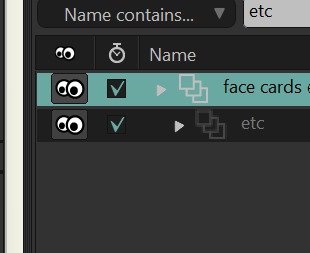
see how the ETC's layers icon looks different than the face cards one? these are frame by frame btw and idk what happened and i need this fixed for a project due in a few weeks HEEELP... :cry:
User avatar
synthsin75
Posts: 10618
Joined: Mon Jan 14, 2008 2:20 pm
Location: Oklahoma
Contact:

Re: what happened to my layers? someone pls help!

Post by synthsin75 »

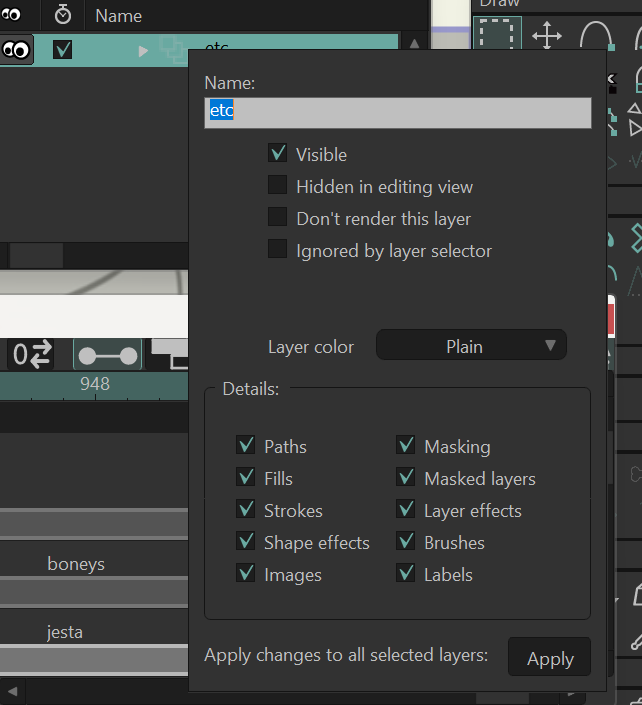
Looks like layer visibility, in the layer properties, is turned off. If so, the timeline should be red if you select that layer.
Since it looks indented, I assume the image is edited to show these layers next to each other. If so, the visibility is likely off for this layer's group/parent layer.
pinkertonian
Posts: 3
Joined: Wed Oct 21, 2026 5:27 pm

Re: what happened to my layers? someone pls help!

Post by pinkertonian »

Image
its not... super confusing cause if i click on my ETC layer i can see my drawings but if i click any other layer it wont show.
also, its not edited. i cant see my etc layer in the 'no filter' category. i had to search it up in the 'name contains' part so i typed in 'etc' onto an normal layer for comparison.
atleast my drawings arent entirely missing. ill just tediously copy and paste them onto a new layer then :cry:
User avatar
Greenlaw
Posts: 11218
Joined: Mon Jun 19, 2006 9:45 am
Location: Los Angeles
Contact:

Re: what happened to my layers? someone pls help!

Post by Greenlaw »

To me, it looks like you somehow turned an FBF layer into a child of another FBF layer. This probably means the child FBF is visible only on the frame it's keyframed for...which, I don't think you can do while it's an FBF layer.

To reproduce the setup here, I had to first convert the parent FBF into a Switch layer, drag the child FBF into it, and then convert the parent Switch layer back into an FBF layer. I'm not sure what practical use there would be to do this, so I'm assuming this was done unintentionally?

If so, you can fix this by converting the parent FBF into a Switch layer and dragging out the child FBF. Then turn the Switch layer back into an FBF layer. To convert an FBF into Switch and back, open the layer's Settings and use the FBF Drawing option in the Switch tab.
Last edited by Greenlaw on Fri Oct 23, 2026 8:26 pm, edited 1 time in total.
Animations, Tutorials, and Cats (Oh, My!) Little Green Dog Channel on YouTube!

D.R. Greenlaw
Artist/Partner - Little Green Dog
Little Green Dog Channel | My DreamWorks Animation Reels & Others
User avatar
synthsin75
Posts: 10618
Joined: Mon Jan 14, 2008 2:20 pm
Location: Oklahoma
Contact:

Re: what happened to my layers? someone pls help!

Post by synthsin75 »

Is that layer in a group or bone layer? If so, check that group/bone layer's visibility.

Dennis, he's filtering by name, so it doesn't show the group. FBF group arrow would point down if you could see a child layer.
User avatar
Greenlaw
Posts: 11218
Joined: Mon Jun 19, 2006 9:45 am
Location: Los Angeles
Contact:

Re: what happened to my layers? someone pls help!

Post by Greenlaw »

Greenlaw wrote: ↑Fri Oct 23, 2026 8:26 pm To me, it looks like you somehow turned an FBF layer into a child of another FBF layer...
Let me follow up with, "...I guess?"

In any case, this setup doesn't look right to me, because in my version, I don't see the child FBF in the Layers window while the parent layer is in FBF mode. (Or is this some other type of group that's using the same icon as FBF?)

Anyway, you can pull out the child FBF as described in my previous post, and I think this should solve the problem. (Unless I've totally misunderstood the problem...which happens.) :D
Animations, Tutorials, and Cats (Oh, My!) Little Green Dog Channel on YouTube!

D.R. Greenlaw
Artist/Partner - Little Green Dog
Little Green Dog Channel | My DreamWorks Animation Reels & Others
User avatar
Greenlaw
Posts: 11218
Joined: Mon Jun 19, 2006 9:45 am
Location: Los Angeles
Contact:

Re: what happened to my layers? someone pls help!

Post by Greenlaw »

synthsin75 wrote: ↑Fri Oct 23, 2026 8:26 pm Dennis, he's filtering by name, so it doesn't show the group. FBF group arrow would point down if you could see a child layer.
Ah! Of course. Thanks. :oops:
Last edited by Greenlaw on Fri Oct 23, 2026 8:47 pm, edited 2 times in total.
Animations, Tutorials, and Cats (Oh, My!) Little Green Dog Channel on YouTube!

D.R. Greenlaw
Artist/Partner - Little Green Dog
Little Green Dog Channel | My DreamWorks Animation Reels & Others
User avatar
synthsin75
Posts: 10618
Joined: Mon Jan 14, 2008 2:20 pm
Location: Oklahoma
Contact:

Re: what happened to my layers? someone pls help!

Post by synthsin75 »

Greenlaw wrote: ↑Fri Oct 23, 2026 8:40 pm
synthsin75 wrote: ↑Fri Oct 23, 2026 8:26 pm Dennis, he's filtering by name, so it doesn't show the group. FBF group arrow would point down if you could see a child layer.
Ah! Of course. Thanks. :oops:
I had to look at the image again, once he said it wasn't edited. Missed it the first time too.
User avatar
Greenlaw
Posts: 11218
Joined: Mon Jun 19, 2006 9:45 am
Location: Los Angeles
Contact:

Re: what happened to my layers? someone pls help!

Post by Greenlaw »

Yeah, okay...now, I was able to reconstruct something resembling the image.

But there could be a number of things going on here. Can you show the hierarchy without the filtering? Or even better, post a stripped down version of the file, because this is just guessing right now.
Animations, Tutorials, and Cats (Oh, My!) Little Green Dog Channel on YouTube!

D.R. Greenlaw
Artist/Partner - Little Green Dog
Little Green Dog Channel | My DreamWorks Animation Reels & Others
gwhitlock64
Posts: 17
Joined: Thu Oct 22, 2026 1:49 am

Re: what happened to my layers? someone pls help!

Post by gwhitlock64 »

Greenlaw wrote:Can you show the hierarchy without the filtering? Or even better, post a stripped down version of the file, because this is just guessing right now.

Greenlaw, fair play for rebuilding the whole thing just to guess at it, that's more effort than I put into my last flat-pack wardrobe. Bit of a mystery this one, like a Port Vale away day... nobody's quite sure what's going on till someone turns up with the evidence. 🙂
pinkertonian
Posts: 3
Joined: Wed Oct 21, 2026 5:27 pm

Re: what happened to my layers? someone pls help!

Post by pinkertonian »

YES!! i also suspected that i accidentally turned it into a child layer but i just had no idea how to fix it. thankfully i could fix it up quickly now that i know . Thank you so much yall :D :D
Post Reply