Page 1 of 1
Eraser Nub
Posted: Wed Jul 01, 2026 8:09 am
by J. Baker
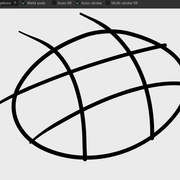
Using a stylus in Moho and the eraser always leaves a nub behind? Anyone know how to solve this?
Re: Eraser Nub
Posted: Wed Jul 01, 2026 8:18 am
by Víctor Paredes
I'm not sure I'm understanding your post correctly, but the Eraser in Moho is different to a bitmap eraser.
Instead of removing pixels, it removes sections of the vector and vector lines can end with flat or round caps, depending on the stroke's properties.
Re: Eraser Nub
Posted: Wed Jul 01, 2026 8:43 am
by J. Baker
I erased the lines but it left these nubs behind. After I erase, they just pop into place. I circled the "nubs" that I talking about.

Re: Eraser Nub
Posted: Wed Jul 01, 2026 9:27 am
by Greenlaw
Are you using Moho 14.4? If so, the current native Eraser doesn't support Trim. You can get this option back by installing SimplSam's Eraser+.
SS - Eraser+
Note that this tool
replaces the existing eraser with a version that supports some additional features. It's a little weird because you will also see a custom icon for the tool in a lower section, and you might think you still have the native Eraser tool. (Well, anyway, I did.) By design, the tool is duplicated in both places.
(Personally, I don't think it should do this, because it could override a future version of the native Eraser that may sport new features. I would prefer to choose which version I wanted to use in the Tools window. If Eraser+ didn't override the native Eraser tool, I would simply re-assign the native keyboard shortcut to Eraser+.)
Here's a comparison, before and after installing Eraser+...
Native Eraser Options:

Eraser+ Options:

Once you have Eraser+ installed, make sure Trim is enabled, and it should remove the line cleanly.
Despite the duplication in the Tools window, I highly recommend this Tool! And while you're at it, check out Sam's Blob Brush+

Re: Eraser Nub
Posted: Wed Jul 01, 2026 9:52 am
by J. Baker
That's interesting. Thanks!
Yeah, I wish it didn't replace the original either. Oh and yes, using version 14.4.

Re: Eraser Nub
Posted: Wed Jul 01, 2026 10:05 am
by Greenlaw
Quick demo...

BTW, the tool in the bottom left corner in my Draw+ section is the duplicate tool.
Re: Eraser Nub
Posted: Wed Jul 01, 2026 10:15 am
by J. Baker
Wow! That's much faster. Moho needs to incorporate this. So that way you don't lose the original Eraser tool.
Re: Eraser Nub
Posted: Wed Jul 01, 2026 2:23 pm
by SimplSam
The reason why it replaces the built-in tool is because that was/is the only way to also allow it to be integrated as the Erase function for Drawing Pens and the Freehand & Blob Brush tools.
However, bowing to significant political pressure - I have now uploaded an unintegrated / non-replacing version, which sits alongside the built in tool - without affecting it.
The unintegrated version has the same filename as the integrated version, so you can simply download and replace.
https://mohoscripts.com/script/ss_eraser/unintegrated
Re: Eraser Nub
Posted: Wed Jul 01, 2026 3:32 pm
by J. Baker
Thank you very much, SimplSam!
Re: Eraser Nub
Posted: Wed Jul 01, 2026 4:30 pm
by synthsin75
If you name the file the same as the LM tool, you won't get the extra tool in the toolbar and it will use your custom icon in the draw section.
So there's no confusion about replacement tools, I've added this at line 1174 in mine: layout:AddChild(LM.GUI.StaticText("<REPLACEMENT>"))
I think this the best of both worlds. LM-only functionality with a clear indication that it's a replacement tool.
Re: Eraser Nub
Posted: Wed Jul 01, 2026 7:14 pm
by Greenlaw
Thanks for giving us these choices, SimplSam and Synthsin75! You guys are awesome!
Will give them both a try tonight.
Re: Eraser Nub
Posted: Thu Jul 02, 2026 12:43 am
by synthsin75
For any scripters interested, I've written the below code to help warn users if they have a third-party replacement tool installed when they update Moho.
It checks the Moho version and prompts the user to check if the new stock tool has new features.
EDIT:
I've figured out a more robust and universal way to mod stock tool replacements so they warn you when an update may have a new version of the tool.
This is one code block that can be pasted on the first line of the IsEnabled fucntion, completely as-is... no editing script names or anything. Just paste this right below:
function XX_ExampleTool:IsEnabled(moho)
Code: Select all
--syn\/
	if (not self.initializedVersion) then
		local name
		for n, value in pairs(_G) do
			if rawequal(value, self) then
				name = n
				break
			end
		end
		-- inject save pref remotely
		local origSavePrefs = self.SavePrefs
		self.SavePrefs = function(self, prefs)
			prefs:SetString(name..".MohoVer", self.MohoVer)
			if origSavePrefs then return origSavePrefs(self, prefs) end
		end
		-- load pref manually
		local path = moho:UserPrefsFile()
		local key = "\""..name..".MohoVer".."\""
		for line in io.lines(path) do
			if (string.find(line, key, 1, true)) then
				self.MohoVer = string.match(line, '"[^"]+"%s+"([^"]+)"')
				break
			end
		end
		self.initializedVersion = true
		self.foundName = name
		-- warn user of replacement tool when Moho updates
		if (self.MohoVer == nil) or (self.MohoVer ~= moho:AppVersion()) then
			local name = self.foundName

			local button = LM.GUI.Alert(LM.GUI.ALERT_WARNING, name.."\n This installed tool is a third-party replacement of the stock tool.\n If you have recently updated Moho, please check if this stock tool has\n been updated, and decide if you want to remove this replacement tool.", "(If you have installed this replacement for the first time, you can ignore this message.)","", "OK", "Remind me later")
			if (button == 0) then
				self.MohoVer = moho:AppVersion()
			end
		else
			self.initializedVersion = true
		end
	end
--syn/\

