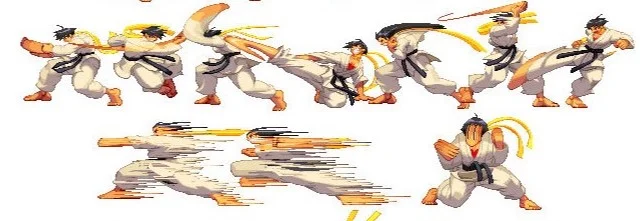
Credits to the artist Billy Edwards for sharing this on facebook:
So if you've watched enough 2D or sometimes even 3D animation, you've seen this effect. Manually drawing this in animation can be tedious as you can imagine. Just a simple brush that lets us paint this effect to different parts of our artwork and I'll be super grateful.
Re: Smear Brush
Posted: Wed Jan 28, 2026 1:27 pm
by hayasidist
quick and dirty test -- custom brush with line boil ... this any use?
Re: Smear Brush
Posted: Thu Jan 29, 2026 12:54 am
by ykarmin88
hayasidist wrote: ↑Wed Jan 28, 2026 1:27 pm
quick and dirty test
Cool take! That looks like some type of quantization or pixelation effect. But it doesn't look like it's emphasizing what animation smears are actually for which is direction of movement.
Just googling stuff:
^^ These ones feel doable in Moho.
But these ones:
^^ These ones would take a while with the current tools. The way I would do this in Moho is I would first stretch the layer based on the directional angle of the movement, then drag a bunch of vector points to create a sawtooth or zigzag-like pattern. I suppose I could use the noise feature, but that one's kinda randomized and we have little control over that(maybe that's what we need?). Still, I believe a feature that would get us this look easier would be appreciated by many. Still feels like it belongs in the realm of vectors.
Re: Smear Brush
Posted: Thu Jan 29, 2026 3:18 am
by hayasidist
Ah! Not a Brush in the moho sense of the word!
A decade or so ago I did this using Sprayed Strokes in PS on a base png plus some other stuff... https://youtu.be/G2SmkkXV1bg. Nothing like that as such in native "one click" Moho -- but plenty of ways to do it.
There is motion blur now (wasn't back in 2014!).
This is a frame from the example with a couple of different options for Motion Blur set.
Splitting the vector into a fill+base stroke and "streak" stroke gives this (again, plenty of scope to change the motion blur parameters on both those layers):
Re: Smear Brush
Posted: Thu Jan 29, 2026 7:53 am
by synthsin75
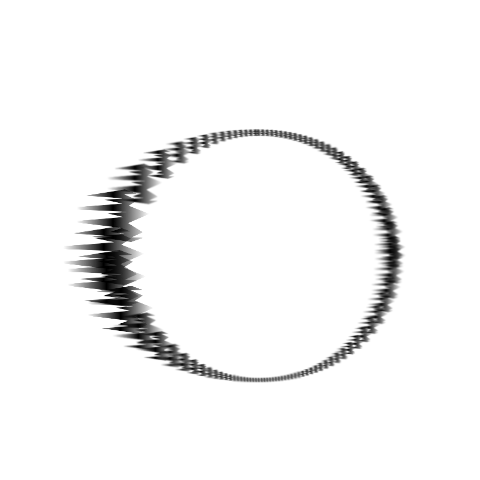
Here's what I got using a brush:
And here's the brush:
But you'd have to have a custom brush for each angle, so it's probably not feasible for dynamic animation.
If brushes had an animated angle setting (not just jitter angle), you'd be able to change its direction to suit the motion.
Re: Smear Brush
Posted: Thu Jan 29, 2026 11:17 am
by Greenlaw
That's pretty cool, Wes!
@ykarmin88, if you have access to After Effects, check out the free effects plugins from OLM. Here's the one for directional blur...
I find effects like this are easier to apply as a post-process during compositing, since they can be isolated with a mask or applied to a separate layer, and ramped in and out; no custom brushes required. (See my tutorial on rendering for compositing.)
Hope this helps.
Re: Smear Brush
Posted: Thu Jan 29, 2026 12:52 pm
by slowtiger
This basically cries for a hybrid approach: animate the scene in Moho, export the frames around the planned smear, do the smear in TVPaint (or whatever bitmap software you use), and import to Moho again. Just 1 frame.
Re: Smear Brush
Posted: Thu Jan 29, 2026 3:04 pm
by synthsin75
I agree. A post or hybrid approach using other software is probably the most flexible. But I know some people like to work in a single software.
Re: Smear Brush
Posted: Fri Jan 30, 2026 4:20 am
by slowtiger
You could use the FBF feature or just create a single layer for 1 frame with Moho's brushes, but there's no way to automate this task in a reasonable way, it's drawing/painting by hand.
Re: Smear Brush
Posted: Sat Jan 31, 2026 12:32 pm
by Greenlaw
Here's another AE plugin for making 'anime-style' smears...
This one is a paid product, but it takes a different approach. Instead of applying the effect over the entire layer, the effect follows a path and affects only what the path crosses. Lots of useful options, including moving the effect along the path.
For example, in the fist animation, you could use this effect to follow the path of the fist and affect only the fist and arm regions.
I've never used this tool, but I might have to look into it. Update: Nope, too expensive for me. Sigh! The entire suite may be worth getting if I used it all the time for paying projects, but that's not my situation.
I think I have a possible 'Moho-only' solution, but I need to test it first. Will share if my idea turns out to be anything.
Re: Smear Brush
Posted: Tue May 12, 2026 4:49 am
by peter wassink
synthsin75 wrote: ↑Thu Jan 29, 2026 7:53 am
...
If brushes had an animated angle setting (not just jitter angle), you'd be able to change its direction to suit the motion.
this sounds like a modest but very useful feature request.