Page 1 of 1
How do I keep the IK elbow under control?
Posted: Wed Nov 26, 2025 10:59 pm
by tifacloud7
Hi everyone! I’ve been running into a recurring issue while animating and I’d love to hear your suggestions or tips.

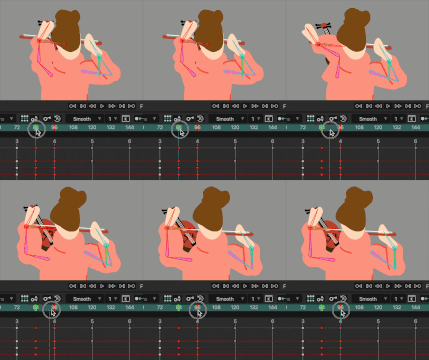
After setting up the arm with an IK controller, the elbow sometimes starts flipping or drifting on its own. Even though both the keys before and after have the elbow pointing outward, the in-between frame ends up bending in a completely different direction.
I could add more keys to force the elbow into place, but that basically means keying almost every single frame, which doesn’t feel right… so I’m guessing I might be doing something wrong.

Do you have any good methods for controlling the elbow direction, or switching the IK’s “side” cleanly?
Any advice would be greatly appreciated. Thanks so much!

Re: How do I keep the IK elbow under control?
Posted: Thu Nov 27, 2025 2:24 am
by slowtiger
The most common source of this is rigging the arm bones in a straight line. Always give it a little bend (same for knees) while riging in frame 0.
Re: How do I keep the IK elbow under control?
Posted: Thu Nov 27, 2025 8:44 am
by synthsin75
When you're using target bones, you can also "prebend" the limb on frame one. You just rotate one of the arm bones in direction you want it to bend, which keyframes it there.
If you don't know which way to pull the arm bone, just go to a frame that gives you trouble, rotate an arm bone until it's correct, and copy that arm bone's keyframe to frame one.
Dennis probably knows this better than I do, so he can correct anything I'm not remembering correctly.
Re: How do I keep the IK elbow under control?
Posted: Thu Nov 27, 2025 1:03 pm
by Greenlaw
synthsin75 wrote: ↑Thu Nov 27, 2025 8:44 am
When you're using target bones, you can also "prebend" the limb on frame one.
Yeah, that should fix the issue. Just use the Transform Bone tool or the Manipulate Bones tool in FK mode, and rotate the bone until it snaps into the preferred direction. I suggest adding a keyframe in the frame before the direction change to hold the rotation, and
then keyframe the rotation change in the frame where it needs to happen. This makes the change happen
only at that frame, not gradually leading up to it.
I think the direction you need to drag is opposite the angle the joint is currently bending, but if that's not right, play around with it in both directions. If the bend direction doesn't change immediately, you probably need to reverse direction.
Note: Typically, you would add a 'prebend' to the joint at frame zero.
This is a very slight bend in the bones, not the artwork, and it lets IK know which is the preferred direction for bending. If you do this, you shouldn't see any weird shakiness or unexpected direction changes, as seen in your example.
When you need to change the direction of the bend (like when the elbow or knee needs to bend in the opposite direction,) use the rotation trick described above.
Tips: For legs, I sometimes add a little stretch in the bones' Bone Constraints to soften the transition. Or, I might keyframe a little shortening in the bones' length at the frame where the direction changes.
Re: How do I keep the IK elbow under control?
Posted: Thu Nov 27, 2025 5:38 pm
by tifacloud7
@slowtiger @synthsin75 @Greenlaw
Thank you all so much for your generous advice — I’m really happy to have learned so much in one go!
This was a huge help! You guys are awesome!